- Domain expiration
- Guides
Domain Expiry Checker: Free, No Signup, No Ads, and What Every Lifecycle Stage Means
Check any domain's expiration date and lifecycle stage in seconds, free and without an account. Then learn what grace, redemption and pending delete really mean, and why the expiry date sometimes lies.
On this page
- How to check a domain's expiration date
- What each part of the result means
- Expiration date
- Days left
- Registrar
- Status codes
- What happens after a domain expires
- Stage 1: Grace period (up to 45 days)
- Stage 2: Redemption period (30 days)
- Stage 3: Pending delete (5 days)
- Stage 4: Released and available
- Why the expiration date sometimes lies
- How to check many domains at once
- Want a domain that's about to expire?
- Free, no signup, no ads: what that actually means
- When a one-off check isn't enough
- A quick renewal checklist for domain owners
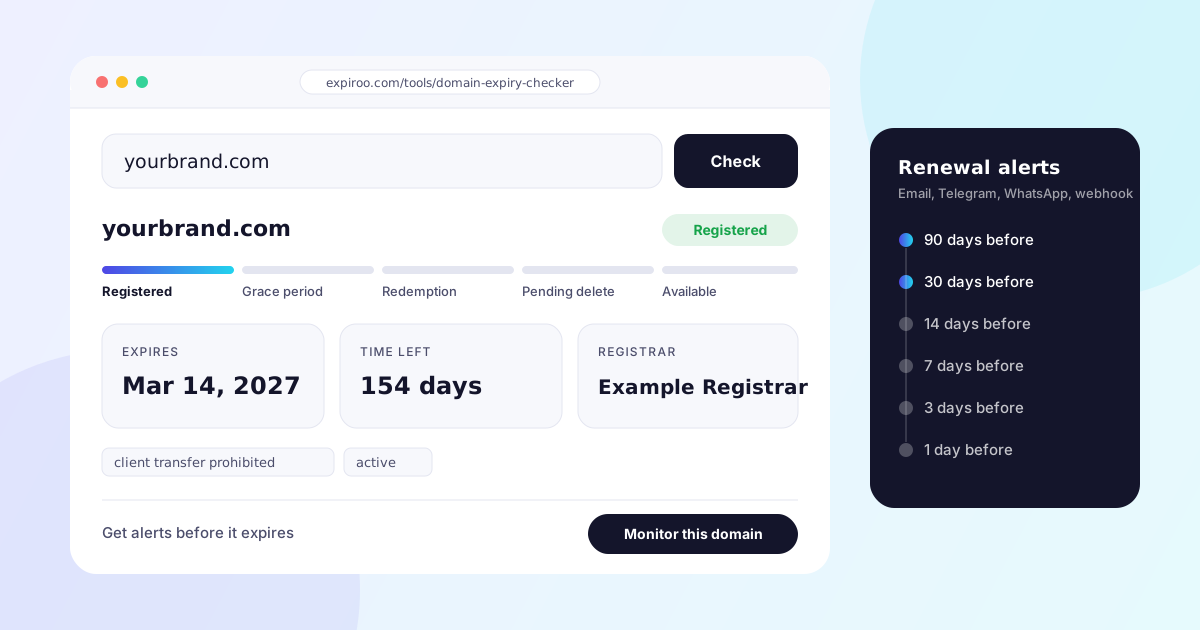
Type a domain into the box below and you get its expiration date, the number of days left, the registrar holding it, and the exact stage of its life it's in right now: registered, expired and in its grace period, in redemption, pending delete, or available to register. It's free, you don't need an account, and there are no ads on the page.
The rest of this guide explains what those results mean, why the expiration date you see is sometimes wrong, and what really happens to a domain in the days after it expires. That last part is where most people lose domains they meant to keep.
How to check a domain's expiration date#
- Type the bare domain, like
yourbrand.com. You can paste a full URL too. The checker stripshttps://,www.and any path for you. - Run the check. The lookup goes straight to the registry that runs that extension (Verisign for .com and .net, for example). If the registry doesn't offer RDAP, it falls back to WHOIS.
- Read the stage first, then the date. The coloured stage bar tells you whether the domain is healthy or already on its way out. The date and the days-left count only mean what they seem to mean when the stage says Registered.
- Look at the status codes under the result if something looks off. They're the registry's own flags, and they explain most surprises (more on those below).
If you only need the date, the standalone domain expiry checker does exactly that. If you want the date plus DNS records and the SSL certificate in one report, use the domain lookup.
What each part of the result means#
Expiration date#
This is the date the current registration period ends. Domains are registered in whole years, from one up to ten, so the date normally sits on the anniversary of the day the domain was first registered or last renewed.
One detail catches people out. A .com has two expiration dates in its records: the registry expiry date (what Verisign has on file) and the registrar expiration date (what the company you pay has on file). They usually match. They stop matching right after a domain expires, because the .com registry renews the domain for another year automatically at the moment it expires and bills the registrar. The registrar then has up to 45 days to either collect the money from you or delete the domain and get a refund.
So if you check a domain that expired last week and the registry date says next year, nobody renewed it. That's the auto-renew, and the status code autoRenewPeriod gives it away.
Days left#
A simple countdown from today to the expiration date. It's the number most worth acting on. Renewing with 30 or more days left means a failed card, an expired payment method or a renewal email lost in a spam folder never turns into downtime.
Registrar#
The company the domain is registered through, such as Namecheap, GoDaddy, Cloudflare or Porkbun. If you own the domain and don't recognise the registrar, that's worth looking into before the renewal date, not after. It usually means someone set it up years ago with an account nobody has the password for any more.
Status codes#
These are EPP status codes, set by the registry and the registrar. The ones you'll actually run into:
| Status code | What it means for you |
|---|---|
ok or active |
Normal. Nothing pending. |
clientTransferProhibited |
A transfer lock your registrar set. This is good: it stops someone moving the domain away without your approval. |
clientHold or serverHold |
The domain is pulled from DNS. Your website and email stop working even though the registration still exists. Registrars often do this right after expiry. |
autoRenewPeriod |
The domain expired and the registry auto-renewed it. You're in the grace period and can still renew at the normal price. |
redemptionPeriod |
The registrar deleted the domain. It can be restored for 30 days, at a higher price. |
pendingRestore |
A restore from redemption has been requested and is being processed. |
pendingDelete |
The final 5 days. It will be released and can't be saved. |
What happens after a domain expires#
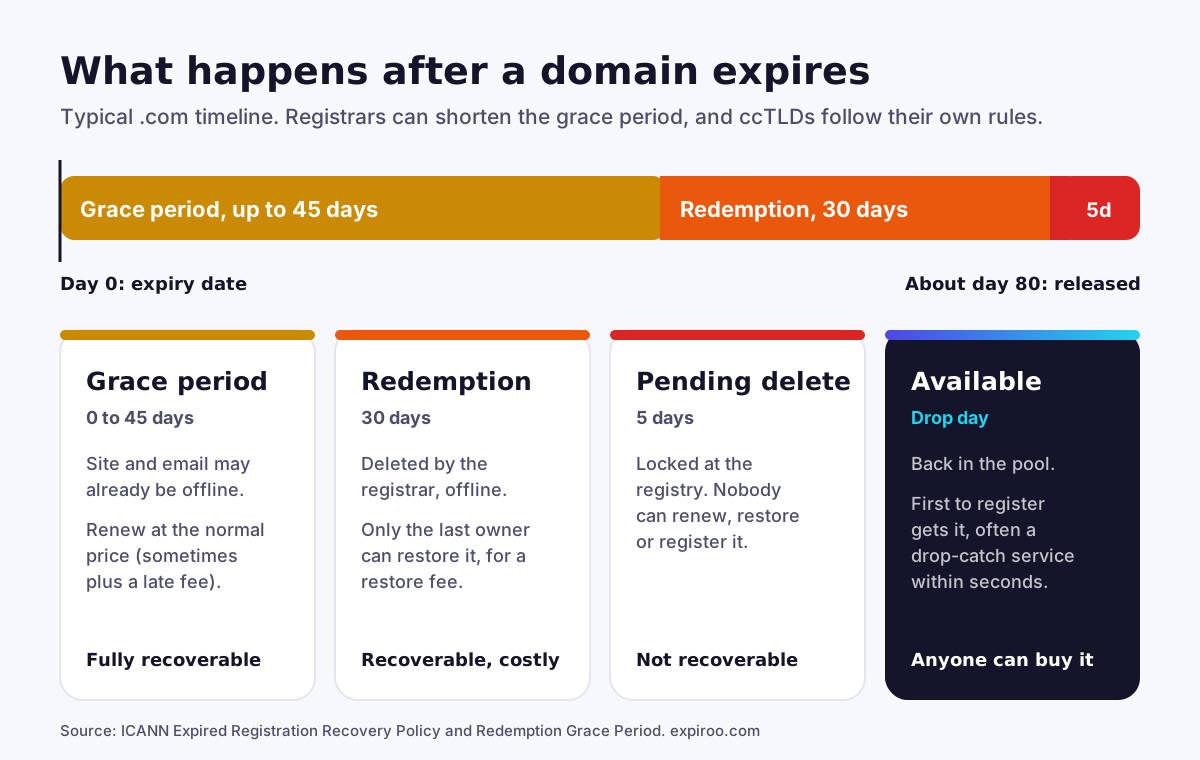
The timeline below is the standard one for generic extensions like .com, .net and .org. Country-code extensions (.uk, .de, .fr and the rest) are run by their own registries with their own rules, so the stages and their lengths can be different there.
Stage 1: Grace period (up to 45 days)#
The registration has ended, but the domain is still yours. You can renew it at the normal renewal price, though some registrars add a late fee.
What surprises people is that the 45 days is the registry's maximum, not a promise. Your registrar decides how much of it you get, and many give you less. ICANN's Expired Registration Recovery Policy also requires registrars to break the domain's DNS for at least the last eight days you can still renew it. In plain terms: your website and your email can stop working while you're still well inside the window to fix it. That's deliberate. It's how registrars make sure the owner notices.
The same policy requires registrars to email you about one month before expiry, about one week before, and once more within five days after. If those emails go to an address nobody reads any more, that's how a domain slips through.
Stage 2: Redemption period (30 days)#
If nobody renews during grace, the registrar deletes the domain and it enters the Redemption Grace Period. ICANN requires every gTLD registry to offer it, and it lasts 30 days.
The domain is offline. Only the previous owner can get it back, through the same registrar, and it costs a restore fee on top of the renewal. Registrars set that fee themselves. It's often somewhere around $80 to $200, and some charge more. Painful, but much cheaper than losing a domain your business runs on.
Stage 3: Pending delete (5 days)#
After redemption the domain is locked at the registry for five days. Nobody can renew it, restore it or register it, including you. At the end of those five days it's deleted from the registry and released.
Stage 4: Released and available#
Once it's deleted, the domain is back in the pool and anyone can register it, first come, first served. In practice, a desirable name rarely stays available for long. Drop-catching services send registration requests the moment the registry releases it. When we tracked three .com names from a published deletion list, all three were registered again on the same day they dropped.
Why the expiration date sometimes lies#
Here's something we only learned by running these checks against live registry data: the expiration date is the least reliable field once a domain has lapsed.
We've seen a .com sitting in its five-day pending delete window that still showed an expiry date two weeks in the future. That's the auto-renew described above. The registry pushed the date forward a year on expiry, and it never came back down when the registrar deleted the domain.
That's why the checker above reads the stage from the status codes, never from the date alone. Two quirks are worth knowing:
- A domain in redemption reports both
redemptionPeriodandpendingDeleteat the same time. A tool that only looks forpendingDeletewill tell you a domain is about to drop when it actually has a month of redemption left. - The registry's "last changed" date usually records the day the domain entered its current stage. That's what makes a drop-day estimate possible. A domain that entered pending delete on, say, October 7 was on Verisign's list to be deleted on October 13.
How to check many domains at once#
If you manage more than a handful of domains, checking them one by one stops being a real process. Two free options:
- CSV portfolio expiry checker: paste or upload a list and get every expiration date back in one table, sorted by what expires first.
- Bulk domain availability: when you're checking names you don't own yet, to see which are free to register.
For a full portfolio, a spreadsheet of renewal dates goes stale the day after you make it. Domains get transferred, renewed early or set to auto-renew with a card that later expires. A monitoring tool rechecks every domain on a schedule so the list is always current.
Want a domain that's about to expire?#
Everything above also works the other way round. If there's a name you want and its owner seems to have let it lapse, the lifecycle tells you how long you'll be waiting.
- Grace period: the owner can still renew at the normal price, and many do at the last minute. Don't count on it.
- Redemption: the owner can still restore it. Your earliest realistic chance is a little over a month away.
- Pending delete: it's going to drop within five days, and you can estimate the day.
The free Domain Watchlist and drop date checker tracks a name through every stage and alerts you as it moves from one to the next, checking more and more often as the drop gets close: daily while it's registered, every 6 hours in redemption, every 15 minutes in pending delete, and every 5 minutes around the expected drop day.
Free, no signup, no ads: what that actually means#
The checker on this page is genuinely free, and we'd rather be specific than make a vague promise:
- No signup: anyone gets 3 checks a day without an account. A free account raises that to 10 a day. Paid plans have no daily cap.
- No ads: there are no ad slots or sponsored results anywhere on the page or in the results.
- Nothing stored: the domain you look up isn't saved to any list or tied to you. The check runs live against the registry and the result goes straight back to your browser.
We keep it free because it's useful on its own, and because some of the people who use it go on to want ongoing monitoring. That's the trade, and it's an honest one.
When a one-off check isn't enough#
Checking a date once tells you about today. It won't tell you that a renewal failed overnight, that auto-renew was switched off when a card expired, or that someone moved the domain to a different registrar.
That's the gap domain monitoring covers. Expiroo rechecks every domain you add and sends alerts 90, 30, 14, 7, 3 and 1 day before it expires, plus one if it actually lapses, by email, Telegram, WhatsApp or a signed webhook. If you renew early, the schedule resets to the new date on its own. The same dashboard also watches uptime, SSL certificates and DNS changes, since an expired SSL certificate or a hijacked nameserver takes a site down just as fast as an expired domain.
A quick renewal checklist for domain owners#
- Turn on auto-renew at your registrar, and check that the card on file won't expire before the next renewal date.
- Use a renewal email address that more than one person reads, like
domains@yourcompany.com, not a former employee's inbox. - Renew important domains for several years at a time. It costs the same per year and removes years of risk.
- Keep the transfer lock on (
clientTransferProhibited) unless you're moving the domain on purpose. - Write down where every domain is registered. Run each one through the WHOIS lookup if you're not sure.
- Don't rely on one reminder. Registrar emails get filtered. An independent alert on a second channel is cheap insurance.
Frequently asked questions
How long after a domain expires can someone else buy it?
For a .com, usually somewhere between about 35 and 80 days. It depends on how much of the 45-day grace period your registrar allows, then 30 days of redemption and 5 days of pending delete. Only after pending delete ends is the domain released for anyone to register.
Why does the expiration date in a lookup differ from what my registrar shows?
The registry and the registrar keep separate expiration dates. When a .com expires, the registry auto-renews it for a year and bills the registrar, so the registry date can jump forward even though you haven't paid. Your registrar's date is the one that reflects your account.
Does a domain stop working the day it expires?
Not always on the same day, but soon after. ICANN's Expired Registration Recovery Policy requires registrars to interrupt the domain's DNS for at least the last eight days it can still be renewed, and many do it right away. When that happens, the website and email on the domain stop working.
What is the difference between the grace period and the redemption period?
In the grace period the domain is still registered to you and you renew it at the normal price. In the redemption period the registrar has deleted it, and only you can restore it, for a restore fee on top of the renewal. Grace lasts up to 45 days, redemption lasts 30.
Can I find out exactly what day an expired domain will be released?
You can estimate it closely. Once a .com enters pending delete, it's released at the end of five days, and the registry's last changed date shows when that window started. Registries delete names in batches, so treat the day as an estimate rather than an exact time.
Do country domains like .uk or .de follow the same timeline?
No. Country-code domains are run by their own registries and set their own rules. Some have no redemption period, and grace periods vary. The stages shown in this guide are the standard ones for generic extensions like .com, .net and .org.
Is RDAP the same as WHOIS?
They answer the same question, who holds a domain and when it expires, but RDAP returns structured data instead of free-form text. ICANN removed the requirement for gTLD registries and registrars to run WHOIS on January 28, 2025, so RDAP is now the standard source.
How much does it cost to restore a domain in redemption?
Registrars set the restore fee themselves. It's often somewhere around $80 to $200 on top of the normal renewal price, and some registrars charge more. Renewing during the grace period avoids the fee entirely.
Written by Expiroo Team
Expiroo monitors domain expiry, uptime, SSL and DNS. We write about what we learn running those checks against real registries and real sites.